
Choose a clear customer, understand the market, explain the product thoroughly, and make the buying experience match the promise.
An online store can have a polished homepage and still struggle because the product pages leave too many questions unanswered. A shopper cannot pick up the item, compare its size in person, or ask an employee standing nearby. Your listing has to do much of that work.
E-commerce strategy connects the product, customer, pricing, presentation, and fulfillment process. Product listings are where those decisions become visible. Improving a listing therefore starts with understanding what the buyer needs to know—not simply rewriting a supplier description.
Find a customer and a reason to choose you
“Anyone who wants this product” is too broad to guide a store. Consider the buyer’s situation. Are they replacing a failed part, purchasing a gift, assembling a system, or buying supplies for a business? Different situations create different questions and priorities.
A replacement buyer may care most about compatibility and delivery. A gift buyer may care about presentation, ease of use, and returns. A professional buyer may need specifications, availability, repeat ordering, and documentation. The same category can contain several distinct markets.
Write a short customer statement: “We help this type of buyer choose this type of product for this particular use.” Then identify a credible reason to buy from your store, such as clearer selection guidance, carefully chosen inventory, or a service you actually provide. Avoid claims you cannot support.
Research the market before copying the competition
Market research helps you test assumptions about demand, alternatives, and customer priorities. The SBA’s business planning resources include market research and competitive analysis. For a small store, begin with a focused comparison rather than a huge report that never changes a decision.
Choose several relevant competitors and record what they sell, who they seem to serve, total delivered price, product information, image quality, availability, delivery promises, and return terms. Compare equivalent products and package contents; a lower advertised price may exclude something another seller includes.
Read customer questions and reviews for recurring uncertainty. Are buyers confused about dimensions? Are accessories missing? Does installation require another component? These observations can help shape your listing, but a few comments are not proof that the entire market shares the same concern.
Keep links and dates so the comparison can be checked.
Turn research into a specific change you can test.
Do not copy competitors’ descriptions, photos, or unsupported claims. Research should help you identify a useful difference and present verified information in your own way. Review the market periodically because prices, products, and customer expectations change.
Check the economics before increasing traffic
Revenue is the amount you sell. It is not the amount you keep. A product can sell regularly while leaving too little to cover operating costs, advertising, or the owner’s time.
Consider the product cost, inbound freight, packaging, payment fees, shipping you absorb, marketplace charges, expected returns, and customer acquisition costs. Separate expenses that occur per order from fixed expenses such as subscriptions or rent. Use actual records where available and label estimates clearly.
In this example, spending $30 to acquire the sale leaves $5 before fixed expenses and other items not included in the example. A revenue-based advertising report could look encouraging while the business result remains weak. Set a practical acquisition-cost limit using your own economics, with an allowance for uncertainty.
The anatomy of an exceptional product listing
A quality listing answers the questions required for a confident purchase. The exact fields depend on the category, but these building blocks provide a strong starting point.
A title that identifies the actual item
Include the product type and the distinguishing details buyers use to choose it: brand where applicable, model, size, material, capacity, or compatibility. Keep the title readable. A string of repeated search phrases makes comparison harder and can look unreliable.
A short explanation of fit and benefit
Explain what the product does and who it suits. Translate features into practical consequences without exaggerating them. “Includes a carrying handle” is a feature; “easier to move between work areas” describes a possible benefit. Verify performance claims rather than improvising them.
Specifications people can compare
Use a consistent table for measurements, materials, capacity, power requirements, model identifiers, and other relevant details. State units. Distinguish product dimensions from package dimensions. If a specification is unavailable, obtain it from a reliable source instead of inventing a plausible number.
Compatibility, limits, and prerequisites
List supported models or applications accurately. Explain installation requirements, limitations, and accessories needed for operation. If customers must check a connector, measurement, or model year, make that instruction prominent before purchase. “Universal” should never stand in for a verified compatibility explanation.
Package contents and variants
State exactly what is included and what is sold separately. If images show optional accessories, label them. Size, color, quantity, and configuration options should match the selected variant’s image, price, stock status, and specifications.
Purchase and after-sale information
Make availability, delivery estimates, shipping charges or calculation method, return conditions, warranty information, and contact options easy to find. Distinguish the manufacturer’s warranty from any store promise. Explain important exclusions where a buyer can see them before committing.
Detail • scale • contents • use
Options • compatibility • limitations
Delivery • returns • questions
Product images should remove uncertainty
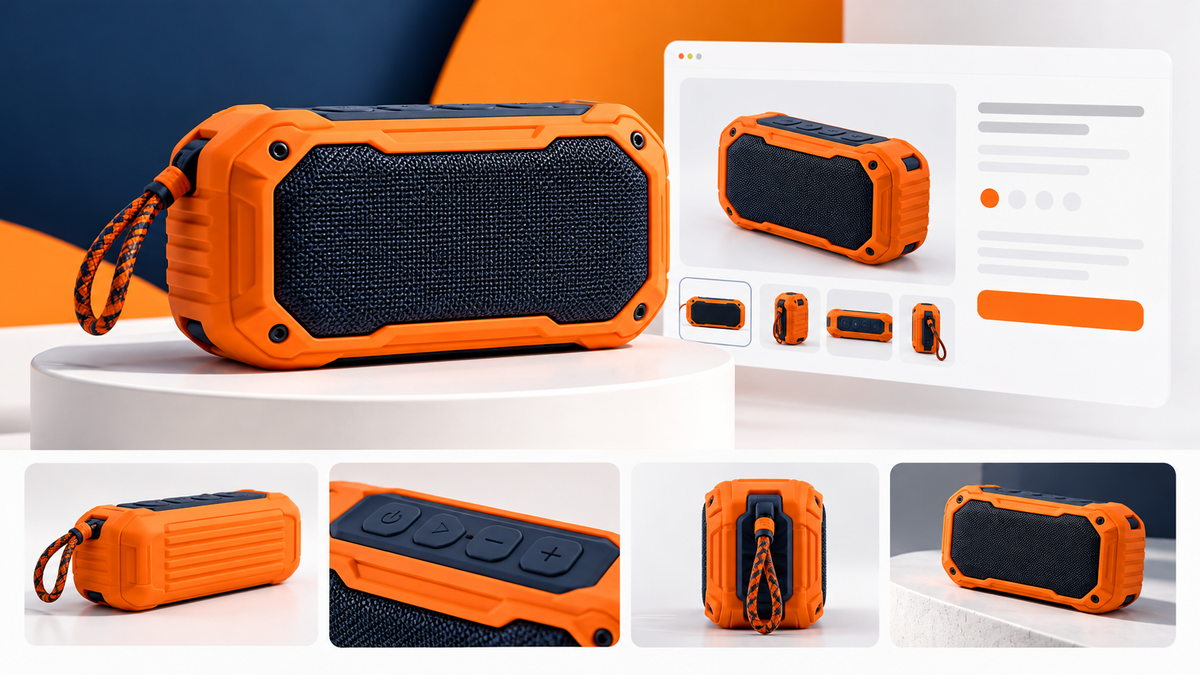
Use a clean main image that clearly represents the item being purchased. Supporting views can show the back, controls, connectors, finish, included pieces, and scale. An appropriate in-use image can explain an application that is difficult to understand from an isolated product shot.
Keep lighting and color reasonably accurate. A dramatic edit that changes the apparent color or hides a defect may produce disappointment after delivery. Photograph the actual variant where possible. Never use a generated product image to imply unverified features or represent stock you have not accurately documented.
For an unfamiliar product, plan a small image sequence: identify the item, show the important detail, establish size, show what comes in the box, and explain use. A diagram can add measurements, but the measurements must be correct. Keep key information in accessible page text as well.
Prepare channel-specific files. Google Merchant Center has its own product image requirements, including rules about accurately showing products and restrictions on promotional overlays. Marketplace requirements can differ from the images appropriate for your own supporting gallery. Check the current specification before exporting a whole catalog.
Resolution alone does not equal quality. A large blurry photo remains blurry. Use sharp originals, sensible compression, consistent framing, and previews that preserve important details. Check both thumbnail size and the enlarged view on a phone.
Organize the store around shopping decisions
Collections and filters should reflect how customers choose, not only how inventory is stored internally. Depending on the catalog, useful filters may include size, application, compatibility, material, or capacity. Too many unclear categories can be as frustrating as too few.
Use consistent product data so filters actually work. If one product says “12 volt,” another says “12V,” and a third has no value, the same characteristic may become difficult to browse. Establish a standard before importing hundreds of listings.
Keep related products relevant. A compatible accessory or a genuinely comparable alternative can help. A random carousel of unrelated items can interrupt a shopper who is trying to confirm a specific requirement.
Make the operational promise believable
The listing and the business behind it must agree. Do not advertise immediate availability when stock records are unreliable. Do not promise a delivery date that ignores handling time. Decide who responds to product questions and how missing information gets corrected.
Map the order journey from checkout to fulfillment, tracking, returns, and support. Record common errors and their causes. A recurring return reason may point to a listing problem, a product-quality issue, or a fulfillment mistake; each requires a different fix.
Keep supplier information and customer-facing content connected through a review process. When specifications, packaging, or warranty terms change, affected listings should be reviewed. A great listing is maintained information, not a one-time writing exercise.
Improve a sample before rebuilding the whole catalog
Choose a small, representative group of products. Include different variants or information challenges. Build a complete listing format, review its accuracy, test the mobile shopping path, and confirm that the data works with collections and any connected sales channels.
Then monitor useful signals: product questions, add-to-cart activity, completed purchases, returns, and customer feedback. Low sales alone do not prove the description is wrong; demand, pricing, traffic quality, and availability also matter.
Use what you learn to improve the format before expanding it. This reduces the chance of repeating an avoidable mistake across a large import and gives the owner a concrete standard for future products.
Turn product information into a better shopping experience
Web Simple can help with online store structure and product listings, supported by inventory and operations organization where needed. The scope can focus on a sample catalog, a storefront rebuild, or a broader cleanup.
Tell us what you sell, approximately how many products and variants you manage, and where customers get stuck. We can discuss the information, imagery, and store improvements that would make a useful starting project.